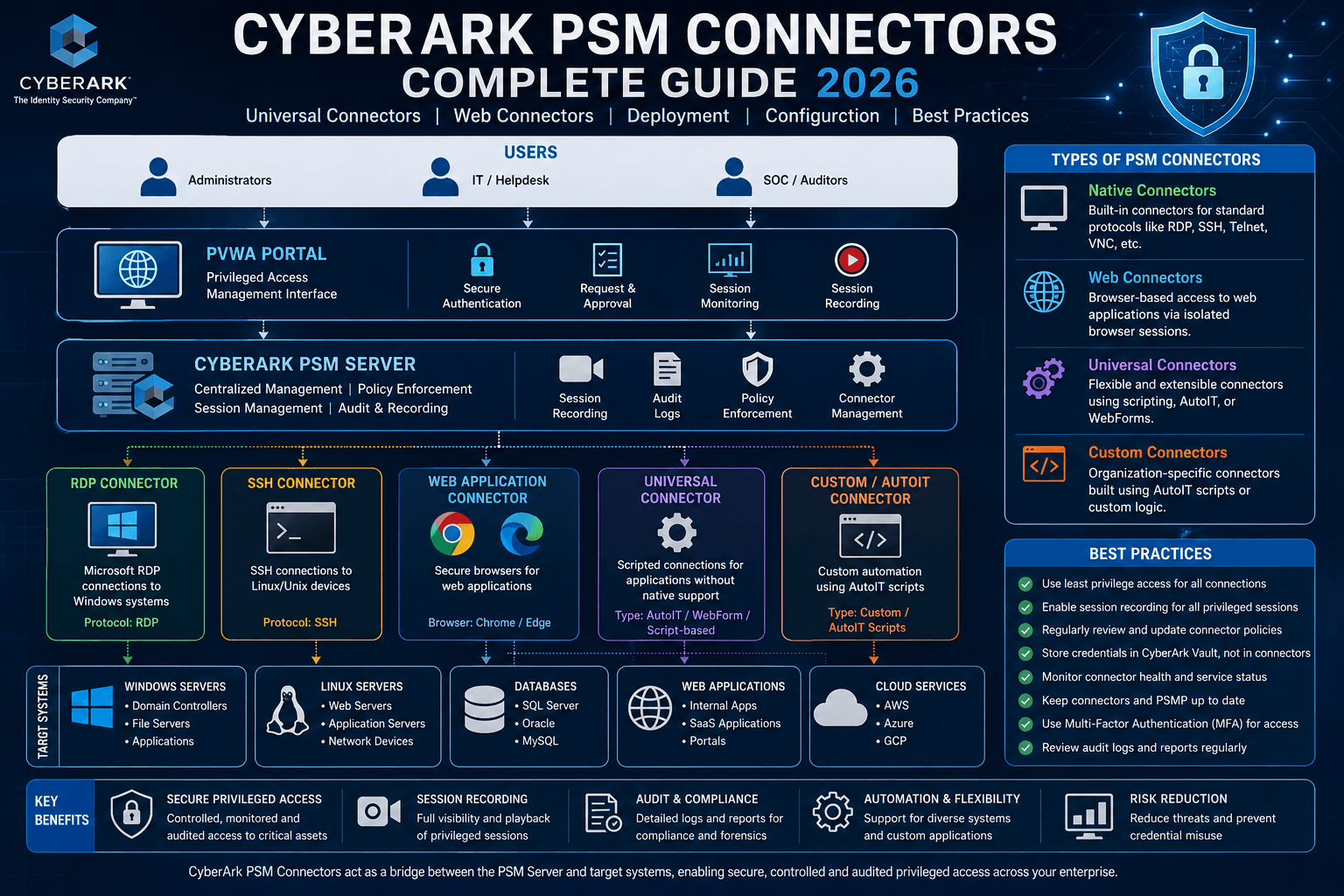
CyberArk Privileged Session Manager (PSM) is one of the most critical components of the CyberArk Privileged Access Management ecosystem. Organizations use PSM to secure, monitor, isolate, and record privileged sessions across servers, databases, network devices, cloud platforms, web applications, and custom business applications.
However, PSM alone cannot establish connections to every target system. This is where PSM Connectors come into play.
PSM Connectors act as the bridge between CyberArk and target systems, enabling secure access, automated authentication, session recording, credential injection, and privileged session monitoring.
As organizations continue to adopt cloud technologies, hybrid infrastructures, custom applications, and SaaS platforms, understanding PSM Connectors has become an essential skill for CyberArk administrators, implementers, and security engineers.
In this comprehensive guide, we will explore PSM Connectors, Universal Connectors, Web Connectors, deployment methods, configuration options, best practices, and real-world implementation scenarios.
PSM Connectors are connection components that allow CyberArk Privileged Session Manager to establish secure connections with target systems.
These connectors define:
▪ How the connection is launched
▪ Which client application is used
▪ How credentials are injected
▪ How session recording is performed
▪ How user interaction is controlled
▪ How auditing and monitoring are enforced
During PSM installation, CyberArk automatically installs several built-in connectors that support common protocols and applications.
Examples include:
▪ RDP
▪ SSH
▪ SQL Server
▪ Oracle
▪ VNC
▪ Telnet
▪ VMware
▪ Web-based applications
Organizations can use these built-in connectors or create their own custom connectors for applications not supported out-of-the-box.
Modern enterprises rarely use only Windows and Linux servers.
Most environments include:
▪ Legacy applications
▪ Mainframes
▪ ERP systems
▪ Web applications
▪ Cloud platforms
▪ Third-party vendor tools
▪ Proprietary applications
CyberArk PSM Connectors allow organizations to extend privileged session management to these systems.
Benefits include:
▪ Session isolation
▪ Credential protection
▪ Session recording
▪ Compliance reporting
▪ Regulatory auditing
▪ Insider threat detection
▪ Privileged access governance
Without connectors, CyberArk cannot automate access to these applications.
A PSM Connector typically consists of:
▪ Connection Component
▪ Platform Association
▪ Target Settings
▪ User Parameters
▪ Dispatcher Executable
▪ Session Recording Components
▪ Credential Injection Logic
The connector determines how CyberArk launches a client application and authenticates to the target system.
The process follows:
User → PVWA → PSM → Connector → Target System
Throughout this process:
▪ Passwords remain hidden
▪ Sessions are recorded
▪ User actions are monitored
▪ Credentials are never exposed
CyberArk provides many built-in connectors.
These include:
▪ RDP Connector
▪ SSH Connector
▪ VNC Connector
▪ SQL Connector
▪ Oracle Connector
▪ VMware Connector
▪ Telnet Connector
▪ Web Application Connector
These connectors are fully supported and maintained by CyberArk.
Organizations can use them immediately after installation.
Many applications are not available by default.
CyberArk Marketplace provides:
▪ Custom connectors
▪ Marketplace-certified connectors
▪ Updated connection components
▪ Specialized integrations
Administrators can download connector packages and import them into the environment.
Marketplace connectors reduce development effort and accelerate deployment.
Related Reading:
👉 CyberArk Privilege Cloud Complete Guide
👉 CyberArk Privilege Cloud vs PAM Self-Hosted
Connection components contain configurable parameters that define session behavior.
These settings can be customized globally or overridden at the platform level.
Parameter:
redirectclipboard:i
Controls clipboard redirection between:
▪ User workstation
▪ Target server
Value:
▪ 0 = Disabled
▪ 1 = Enabled
Disabling clipboard redirection improves security by preventing data exfiltration.
Parameter:
redirectprinters:i
Controls printer redirection during RDP sessions.
Value:
▪ 0 = Disabled
▪ 1 = Enabled
Many organizations disable printer redirection to prevent sensitive document leakage.
Determines whether RemoteApp functionality is enabled.
Value:
▪ Yes = Disabled
▪ No = Enabled
RemoteApp improves user experience by displaying only the target application instead of the full desktop.
Navigate to:
PVWA
Administration
Configuration Options
Connection Components
Select the connection component you wish to modify.
Administrators can:
▪ Add custom parameters
▪ Modify default parameters
▪ Configure target settings
▪ Define client-specific options
▪ Enable custom authentication workflows
After changes are applied, PSM refreshes the configuration according to the ConfigurationRefreshInterval parameter.
Universal Connectors extend CyberArk session management to applications not supported natively.
The PSM Universal Connector framework allows organizations to create connectors using AutoIt scripting.
This enables:
▪ Application automation
▪ Login automation
▪ Session establishment
▪ Custom workflows
▪ Task automation
Examples include:
▪ SAP GUI
▪ Banking applications
▪ Manufacturing software
▪ Healthcare systems
▪ Internal business applications
Universal Connectors provide:
▪ Rapid integration
▪ Credential injection
▪ Session recording
▪ Audit logging
▪ Support for proprietary applications
▪ Reduced development complexity
Organizations can secure virtually any application without waiting for vendor support.
After creating or downloading a connector package:
Navigate to:
PVWA
Administration
Platform Management
Select the desired platform.
Choose:
Manage PSM Connectors
Upload the connector package.
CyberArk validates and imports the connector.
The connector can then be associated with the platform.
Before importing any connector:
▪ Validate source authenticity
▪ Review code
▪ Scan for malware
▪ Verify no sensitive data is stored
▪ Test functionality
▪ Conduct security review
CyberArk recommends reviewing all custom code before deployment.
Custom Universal Connectors require configuration inside PVWA.
Administrators typically:
▪ Duplicate a sample connector
▪ Assign a unique ID
▪ Configure dispatcher executable
▪ Configure application window details
▪ Define user interaction settings
▪ Associate connector with platform
The connector ID should clearly identify its purpose.
Example:
PSM-SAPGUI
PSM-CustomERP
PSM-HRPortal
One of the most important parameters is:
ClientDispatcher
This parameter specifies the executable launched by PSM.
Example:
PSMRealVNCDispatcher.exe
For custom connectors, replace this value with your compiled executable.
Administrators can configure:
▪ MainWindowTitle
▪ MainWindowClass
These settings allow PSM to identify and lock the application window.
Benefits include:
▪ Preventing unauthorized access
▪ Session containment
▪ Improved recording accuracy
By default:
BlockUserInput = Yes
PSM prevents user interaction during authentication.
This prevents:
▪ Credential exposure
▪ Login interruption
▪ Authentication failures
For applications requiring user input:
BlockUserInput = No
can be configured.
After configuration:
Navigate to:
Platform Management
Platform
UI & Workflows
Connection Components
Add the connector.
Specify:
▪ Connector ID
▪ Enabled Status
Save the configuration.
The connector becomes available for all accounts using that platform.
Large enterprises often deploy multiple PSM servers.
Maintaining connectors individually becomes difficult.
CyberArk solves this through centralized deployment.
CyberArk provides:
PSMUniversalConnectors
Safe
This acts as a central repository.
Benefits:
▪ Centralized management
▪ Version control
▪ Automated deployment
▪ Consistency across PSM servers
Upload connector packages to:
PSMUniversalConnectors Safe
During the next configuration refresh:
▪ Connectors are downloaded
▪ Packages are installed
▪ Existing versions are updated
▪ Deleted packages are removed
Default refresh interval:
10 minutes
If required:
Edit:
basic_psm.ini
Add:
EnableConnectorsDeployment=No
This prevents automatic deployment on that specific PSM server.
To remove a connector:
▪ Delete package from PSMUniversalConnectors Safe
▪ Remove connector files
▪ Clean AppLocker rules
▪ Refresh PSM configuration
This ensures complete removal from the environment.
CyberArk allows platform-level customization.
Navigate to:
Administration
Platform Management
Configure:
Privileged Session Management
Options include:
▪ PSM Server Selection
▪ Session Recording
▪ Dual Control Settings
▪ Transparent Connections
▪ Session Restrictions
This provides flexibility for different platform requirements.
PSM for SSH supports custom authentication prompts.
Default prompt:
Password:
Organizations can customize prompts for:
▪ RSA Tokens
▪ OTP Authentication
▪ Smart Cards
▪ MFA Solutions
Configuration file:
/etc/opt/CARKpsmp/components/components.conf
Parameter:
PasswordPrompt
Some systems use non-standard shell prompts.
CyberArk PGU supports customization through:
CyberArk.PGU.exe.config
Parameter:
StandardPrompt
Custom regex values allow PSM to identify successful logins accurately.
This is especially useful for:
▪ Unix systems
▪ Network devices
▪ Legacy systems
Web applications are increasingly critical.
CyberArk PSM Web Connectors provide secure access to browser-based applications.
These connectors:
▪ Launch browsers
▪ Navigate websites
▪ Inject credentials
▪ Record sessions
▪ Monitor activities
CyberArk provides the Plugin Generator Utility for web connector creation.
The utility records:
▪ User actions
▪ Button clicks
▪ Text entries
▪ Authentication workflows
The recorded process is converted into a deployable connector.
Administrators configure:
▪ Connector Name
▪ URL
▪ Action Timeout
▪ Page Load Timeout
▪ Dynamic Parameters
▪ Authentication Steps
This enables flexible automation of web logins.
Dynamic parameters allow runtime substitution.
Examples:
▪ Username
▪ Password
▪ Address
▪ Domain
▪ Account ID
These values are retrieved directly from CyberArk and inserted securely.
After recording:
▪ Generate connector
▪ Execute test run
▪ Validate login process
▪ Export ZIP package
The generated package can then be imported into PVWA and deployed across the environment.
▪ Download validated connectors from CyberArk Marketplace
▪ Maintain version control for custom connectors
▪ Perform regression testing after upgrades
▪ Review AutoIt scripts regularly
▪ Restrict clipboard and printer redirection
▪ Use centralized deployment through PSMUniversalConnectors Safe
▪ Implement least privilege access
▪ Monitor session recordings regularly
▪ Audit connector usage periodically
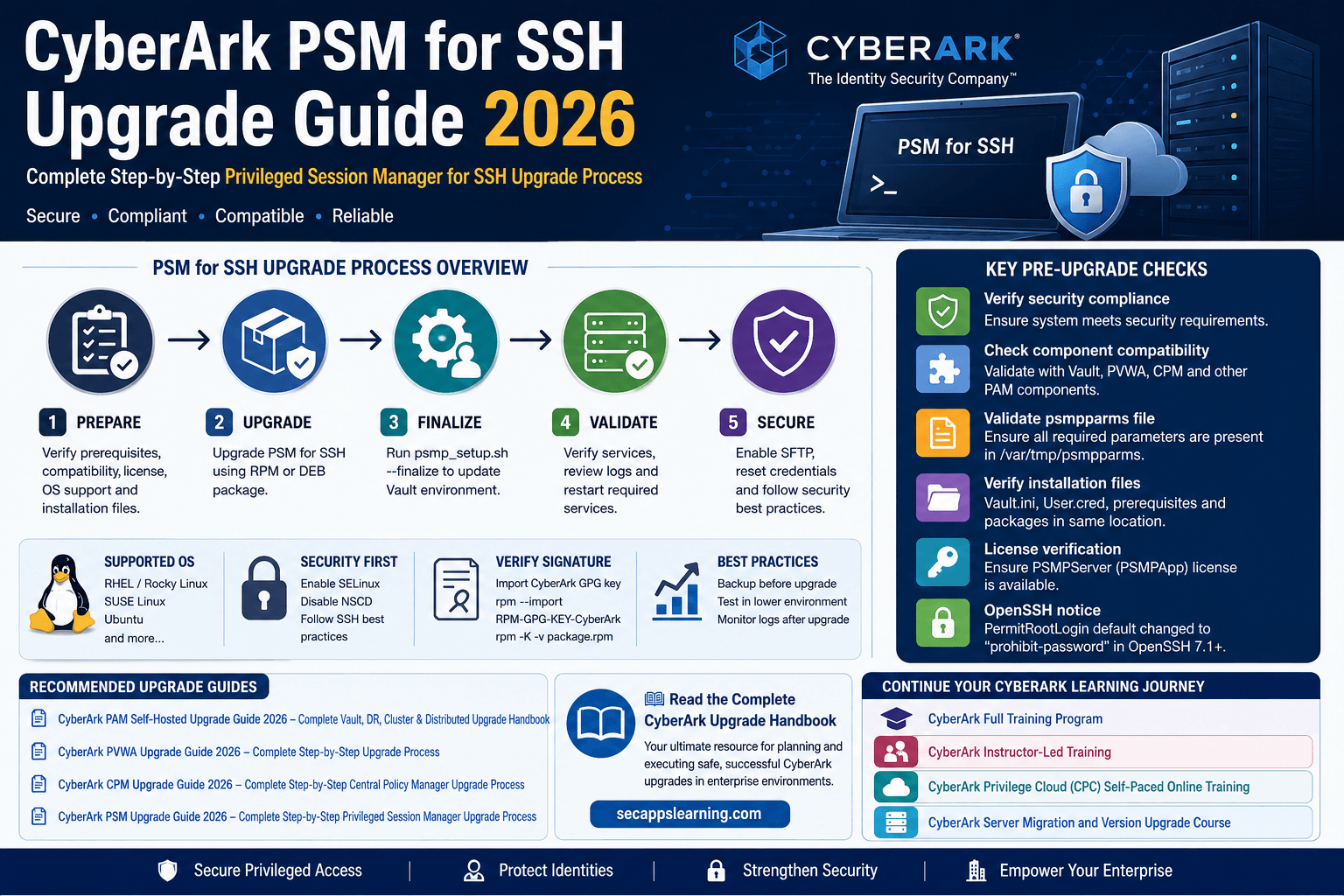
👉 CyberArk PSM for SSH Installation Guide 2026
👉 CyberArk SIA vs PSM Complete Guide
👉 CyberArk Privilege Cloud Architecture Guide
👉 CyberArk Privilege Cloud vs PAM Self-Hosted
👉 SailPoint Identity Security Cloud User Guide 2026
CyberArk PSM Connectors are the foundation of secure privileged session management. Whether you are connecting to Windows servers, Linux hosts, databases, web applications, cloud services, or proprietary business systems, connectors provide the automation and security layer required to establish secure privileged access.
Organizations that effectively leverage built-in connectors, Universal Connectors, Web Connectors, and centralized deployment strategies can significantly improve security, compliance, visibility, and operational efficiency across their privileged access environment.
As enterprises continue adopting hybrid and cloud-first architectures, mastering CyberArk PSM Connectors has become a critical skill for CyberArk administrators, implementation engineers, consultants, and security architects.
Advance your CyberArk skills with SecApps Learning's practical training programs:
▪Learn CyberArk CPM Plugins and PSM Web Connectors
▪ Learn CyberArk Privilege Cloud (CPC)
▪ Learn CyberArk PAS Installation on AWS Cloud (1-Click Installation)
Your email address will not be published. Required fields are marked*
 August 28 2026
 July 26 2026
 Explained Architecture, Plugins, Connector Management, Hardening and Complete Credential Rotation Guide (2026).png) July 24 2026
July 24 2026
 July 24 2026
.png) July 17 2026
July 17 2026
 July 16 2026
 July 10 2026
 July 09 2026
 July 05 2026
 — Complete Vault, DR, Cluster & Distributed Upgrade Handbook-.png) July 03 2026
July 03 2026
 vs Central Credential Provider (CCP) Complete Guide to Installation, Architecture, Licensing, SDKs, ASCP & Best Practices (2026)-.png) July 01 2026
July 01 2026
.png) June 30 2026
June 30 2026
 June 25 2026
 June 24 2026
.png) June 10 2026
June 10 2026
 June 09 2026
 – Complete Architecture, Deployment, HA, DR & Best Practices Guide 2026.png) June 06 2026
June 06 2026
 Certification Guide 2026 by SL.png) June 04 2026
June 04 2026
 Complete Guide 2026 – Identity Protection, Identity Threat Detection, AI-Powered Security Monitoring, Response Playbooks, and ISI Migration.png) June 02 2026
May 30 2026
June 02 2026
May 30 2026
 Complete Guide – Architecture, Security, User Provisioning & Identity Governance.png) May 29 2026
May 29 2026
 Complete Guide – IdentityIQ, Identity Security Cloud (ISC), Certification, Architecture & Career Roadmap.png) May 27 2026
May 27 2026
 Complete Getting Started Guide – Architecture, Configuration & Real-World Implementation.png) May 26 2026
May 26 2026
 – Complete Comparison 2026.png) May 24 2026
May 24 2026
 May 22 2026
 May 21 2026
 vs Privileged Session Manager (PSM) Complete 2026 Guide.png) May 20 2026
May 20 2026
 May 19 2026
.png) May 18 2026
May 18 2026
.png) May 17 2026
May 17 2026
 The Complete Beginner to Advanced Guide to Ethical Hacking.png) May 15 2026
May 15 2026
 May 15 2026
 May 14 2026
 by SecApps Learning.png) May 14 2026
May 14 2026
 May 13 2026
 (1).png) May 12 2026
May 12 2026
.png) May 11 2026
May 11 2026
 May 10 2026
 May 10 2026
 May 08 2026
.png) May 07 2026
May 07 2026
.png) May 06 2026
May 06 2026
.png) May 06 2026
May 06 2026
 Complete Guide (2026).png) May 05 2026
May 05 2026
.png) May 05 2026
May 05 2026
 (1).png) May 04 2026
May 04 2026
.png) May 03 2026
May 03 2026
.png) May 01 2026
May 01 2026
.png) May 01 2026
May 01 2026
.png) April 30 2026
April 30 2026
.png) April 29 2026
April 29 2026
.png) April 28 2026
April 28 2026
.png) April 27 2026
April 27 2026
 System Health, Safe Management, Platform & Master Policy Explained.png) April 26 2026
April 26 2026
 April 20 2026
.png) April 19 2026
April 19 2026
.png) April 17 2026
April 17 2026
.png) April 16 2026
April 16 2026
.png) April 15 2026
April 15 2026
 April 14 2026
 April 10 2026
 April 09 2026
 April 08 2026
 April 07 2026
 July 31 2025
 May 01 2026
 December 26 2024
 December 15 2024
.jpeg) December 08 2024
December 08 2024
 May 01 2026
 October 29 2024
 October 19 2024
 October 15 2024
 October 07 2024
 September 30 2024
 September 23 2024
 September 16 2024
 May 04 2026
 August 27 2024
 August 27 2024
 August 21 2024
 August 19 2024
 May 01 2026
 May 10 2024
 May 08 2024
 May 01 2026
 April 30 2024
.jpg) April 29 2024
April 29 2024
 April 25 2024
 April 22 2024
 April 12 2024
 April 05 2024
 March 30 2024
 May 01 2026
 March 27 2024
 March 27 2024
 March 11 2024
 March 07 2024
 February 29 2024
.jpg) May 01 2026
May 01 2026
 January 24 2024
 January 20 2024
 January 20 2024
 January 20 2024
 January 20 2024
 January 03 2024
 January 03 2024
 January 03 2024
 January 03 2024
Copyright 2022 SecApps Learning. All Right Reserved

Comments ()