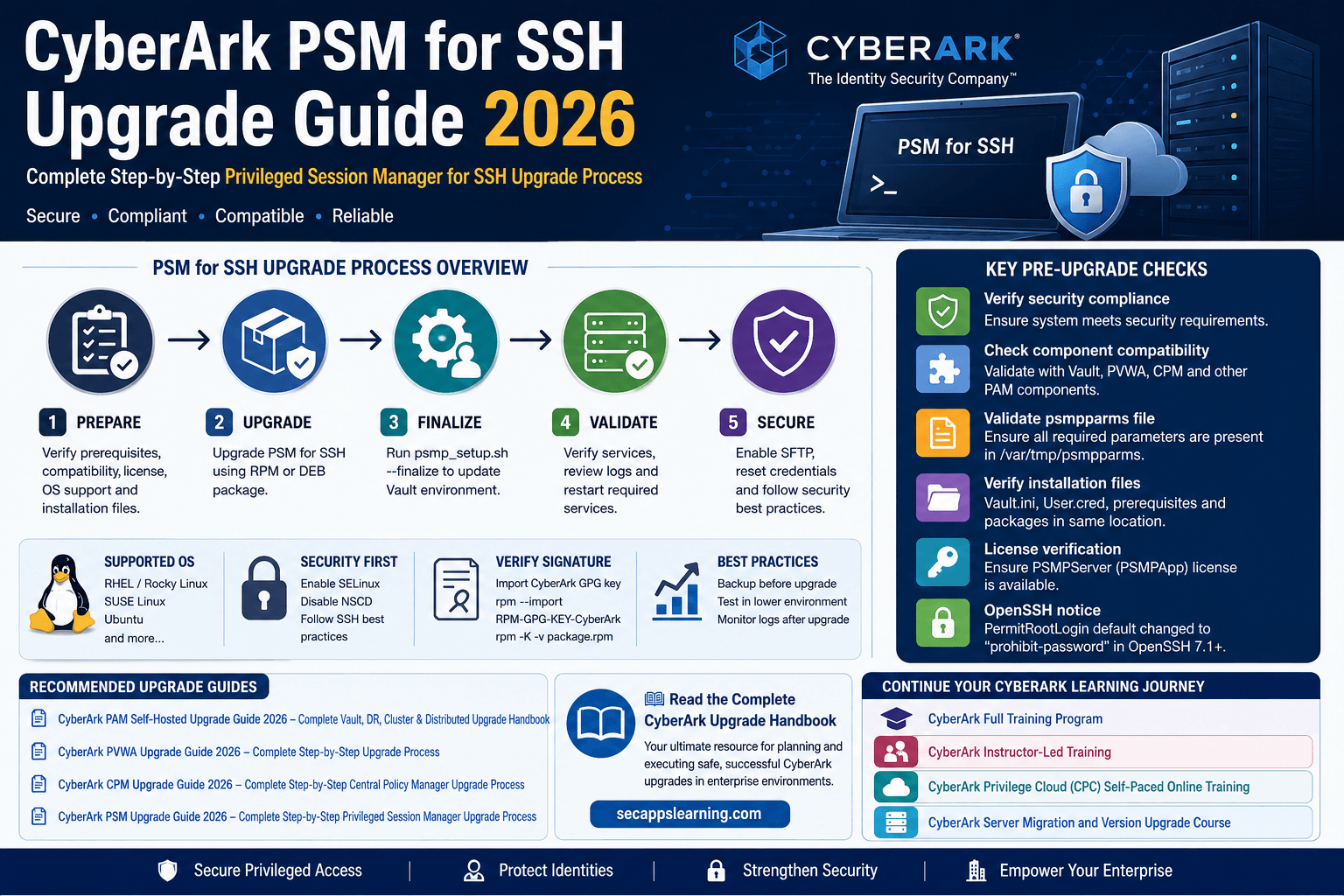
Estimated Reading Time: 12–15 Minutes
Privileged access to Linux and Unix systems remains one of the most critical areas of enterprise security. Organizations running CyberArk Privileged Access Manager (PAM) rely on Privileged Session Manager for SSH (PSM for SSH) to securely isolate, monitor, and record SSH sessions without exposing privileged credentials to end users.
As organizations adopt newer versions of CyberArk PAM, upgrading PSM for SSH becomes an essential maintenance activity to ensure compatibility, security compliance, and supportability across the entire CyberArk ecosystem.
This guide walks through the complete CyberArk PSM for SSH upgrade process, including prerequisites, installation preparation, standard upgrades, upgrading from Idaptive/Idira SSHD mode, post-upgrade validation, SELinux considerations, and credential updates.
CyberArk PSM for SSH acts as a secure proxy between administrators and target Unix/Linux systems. Instead of connecting directly to servers, users authenticate through the PSM for SSH server, allowing organizations to:
In large environments, PSM for SSH is often deployed alongside Vault, PVWA, CPM, and traditional Windows-based PSM components to provide comprehensive privileged access coverage.
Before initiating the upgrade process, verify all prerequisites and validate the existing environment.
Ensure the existing Linux server continues to comply with your organization's security baseline and CyberArk Security Fundamentals documentation.
Confirm that the target PSM for SSH version is compatible with:
• CyberArk Vault
• PVWA
• CPM
• Traditional PSM
• DR Vault
• PTA (if deployed)
Ensure the /var/tmp/psmpparms file contains all required installation parameters before beginning the upgrade.
Confirm the following files are available in the installation directory:
• RPM/DEB package
• Vault.ini
• User.cred
• Prerequisites folder
• Supporting installation packages
CyberArk administrators should pay special attention to changes introduced in OpenSSH 7.1 and later.
OpenSSH versions 7.1 and above changed the default value of PermitRootLogin to prohibit-password. If your server still uses the default SSH configuration, the root user will no longer authenticate remotely using passwords after the PSM for SSH upgrade.
CyberArk recommends:
• SSH key-based root access.
• Creating a dedicated administrative account.
• Avoiding password-based root logins.
PSM for SSH supports multiple Linux distributions. Prior to upgrading, ensure your operating system is supported.
Always verify support against the CyberArk compatibility matrix before proceeding.
CyberArk RPM packages are digitally signed to prevent tampering.
Import the CyberArk public key:
rpm --import RPM-GPG-KEY-CyberArk
Validate the package:
rpm -K -v CARKpsmp-.rpm
Verifying package signatures is considered a best practice in production environments and should be included in all enterprise change procedures.
PSM for SSH installations require a valid CyberArk license.
User Type: PSMPServer
Interface: PSMPApp
Without a valid license, PSM for SSH installation and upgrades cannot be completed successfully.
The Vault user performing the installation or upgrade should possess the following permissions:
• Add Safes
• Audit Users
• Add/Update Users
• Manage Server File Categories
Additionally, the account must be an owner of the PVWAConfig Safe with:
CyberArk recommends enabling SELinux before installing or upgrading PSM for SSH.
Install the required package:
yum install -y policycoreutils-python-utils
If SELinux is enabled after installation, additional post-installation activities may be required.
Create a dedicated directory for installation files.
mkdir -p /opt/CARKpsmp
Copy the following into the directory:
CyberArk recommends disabling NSCD to prevent unexpected authentication behavior.
Stop the service:
systemctl stop nscd.service nscd.socket
Disable it permanently:
systemctl disable nscd.service nscd.socket
Log in to the PSM for SSH server as the root user.
rpm -Uvh CARKpsmp--.x86_64.rpm
dpkg -i CARKpsmp-..deb
Create the credential file:
/opt/CARKpsmp/bin/createcredfile user.cred
Run the finalize command:
/opt/CARKpsmp/bin/psmp_setup.sh --finalize --credfile user.cred
Upon successful completion:
If issues occur, review:
/var/opt/CARKpsmp/temp/psmp_setup.log
If SELinux is enabled:
systemctl restart sshd
On the PVWA server:
iisreset
Alternatively, wait for the PVWA configuration refresh interval to complete.
Organizations upgrading from Idaptive SSHD mode should perform additional cleanup activities.
Remove the Parameter
Edit:
/var/tmp/psmpparms
Remove:
InstallCyberArkSSHD
yum erase openssh openssh-server openssh-clients

yum install openssh openssh-server openssh-clients
Delete the following accounts:
Example:
userdel -r PSMConnect
Also remove associated home directories.
Delete:
groupdel PSMConnectUsers
Finally, perform the upgrade:
rpm -U CARKpsmp-.rpm
Verify PSM for SSH services are running.
service psmpsrv status
RHEL 8+
systemctl status psmpsrv-*
Review logs:
PSMPConsole.log
Location: /var/opt/CARKpsmp/logs
ADBConsole.log
Location: /var/opt/CARKpsmpadb/logs
During hardening, the SFTP subsystem may be disabled.
Edit:
/etc/ssh/sshd_config
Uncomment:
Subsystem sftp /usr/libexec/openssh/sftp-server
Restart SSHD after making changes.
If installation corruption or package issues occur, use the force upgrade option:
rpm -Uvh --force CARKpsmp--.x86_64.rpm
This can be particularly useful in lab environments or during interrupted upgrades.
If upgrading from versions earlier than 12.2, administrators may need to recreate credential files.
Affected accounts include:
Example:
./CreateCredFile psmpappuser.cred Password \
-Username  \
-Password  \
-OSUsername root \
-AppType PSMPApp \
-ExePath /opt/CARKpsmp/bin/psmpserver \
-EntropyFile
Modern CyberArk versions automatically perform these updates when:
• Take VM snapshots before upgrading.
• Validate backups of Vault and PSM configurations.
• Upgrade in lower environments first.
• Schedule maintenance windows.
• Verify component compatibility.
• Monitor logs post-upgrade.
• Test SSH session recordings after completion.
CyberArk PSM for SSH upgrades are relatively straightforward when proper planning and prerequisite validation are performed. Paying close attention to OpenSSH changes, SELinux configurations, credential updates, and service validation ensures a smooth and secure upgrade experience.
For enterprise deployments, always document rollback procedures, validate compatibility across all PAM components, and execute upgrades during approved maintenance windows.
Whether you are a CyberArk Engineer, PAM Architect, or Security Consultant, this comprehensive guide explains how real enterprise CyberArk upgrades are planned and executed safely in production environments.
Advance your CyberArk skills with hands-on, enterprise-focused training:
SecApps Learning helps cybersecurity professionals build real-world CyberArk expertise through enterprise-grade labs, instructor-led training, certification preparation, and production-focused upgrade workshops.
Your email address will not be published. Required fields are marked*
 August 28 2026
 July 26 2026
 Explained Architecture, Plugins, Connector Management, Hardening and Complete Credential Rotation Guide (2026).png) July 24 2026
July 24 2026
 July 24 2026
.png) July 17 2026
July 16 2026
July 17 2026
July 16 2026
 July 10 2026
 July 09 2026
 July 05 2026
 — Complete Vault, DR, Cluster & Distributed Upgrade Handbook-.png) July 03 2026
July 03 2026
 vs Central Credential Provider (CCP) Complete Guide to Installation, Architecture, Licensing, SDKs, ASCP & Best Practices (2026)-.png) July 01 2026
July 01 2026
.png) June 30 2026
June 30 2026
 June 25 2026
 June 24 2026
.png) June 10 2026
June 10 2026
 June 09 2026
 – Complete Architecture, Deployment, HA, DR & Best Practices Guide 2026.png) June 06 2026
June 06 2026
 Certification Guide 2026 by SL.png) June 04 2026
June 04 2026
 Complete Guide 2026 – Identity Protection, Identity Threat Detection, AI-Powered Security Monitoring, Response Playbooks, and ISI Migration.png) June 02 2026
June 02 2026
 May 30 2026
 Complete Guide – Architecture, Security, User Provisioning & Identity Governance.png) May 29 2026
May 29 2026
 Complete Guide – IdentityIQ, Identity Security Cloud (ISC), Certification, Architecture & Career Roadmap.png) May 27 2026
May 27 2026
 Complete Getting Started Guide – Architecture, Configuration & Real-World Implementation.png) May 26 2026
May 26 2026
 – Complete Comparison 2026.png) May 24 2026
May 24 2026
 May 22 2026
 May 21 2026
 vs Privileged Session Manager (PSM) Complete 2026 Guide.png) May 20 2026
May 20 2026
 May 19 2026
.png) May 18 2026
May 18 2026
.png) May 17 2026
May 17 2026
 The Complete Beginner to Advanced Guide to Ethical Hacking.png) May 15 2026
May 15 2026
 May 15 2026
 May 14 2026
 by SecApps Learning.png) May 14 2026
May 14 2026
 May 13 2026
 (1).png) May 12 2026
May 12 2026
.png) May 11 2026
May 11 2026
 May 10 2026
 May 10 2026
 May 08 2026
.png) May 07 2026
May 07 2026
.png) May 06 2026
May 06 2026
.png) May 06 2026
May 06 2026
 Complete Guide (2026).png) May 05 2026
May 05 2026
.png) May 05 2026
May 05 2026
 (1).png) May 04 2026
May 04 2026
.png) May 03 2026
May 03 2026
.png) May 01 2026
May 01 2026
.png) May 01 2026
May 01 2026
.png) April 30 2026
April 30 2026
.png) April 29 2026
April 29 2026
.png) April 28 2026
April 28 2026
.png) April 27 2026
April 27 2026
 System Health, Safe Management, Platform & Master Policy Explained.png) April 26 2026
April 26 2026
 April 20 2026
.png) April 19 2026
April 19 2026
.png) April 17 2026
April 17 2026
.png) April 16 2026
April 16 2026
.png) April 15 2026
April 15 2026
 April 14 2026
 April 10 2026
 April 09 2026
 April 08 2026
 April 07 2026
 July 31 2025
 May 01 2026
 December 26 2024
 December 15 2024
.jpeg) December 08 2024
December 08 2024
 May 01 2026
 October 29 2024
 October 19 2024
 October 15 2024
 October 07 2024
 September 30 2024
 September 23 2024
 September 16 2024
 May 04 2026
 August 27 2024
 August 27 2024
 August 21 2024
 August 19 2024
 May 01 2026
 May 10 2024
 May 08 2024
 May 01 2026
 April 30 2024
.jpg) April 29 2024
April 29 2024
 April 25 2024
 April 22 2024
 April 12 2024
 April 05 2024
 March 30 2024
 May 01 2026
 March 27 2024
 March 27 2024
 March 11 2024
 March 07 2024
 February 29 2024
.jpg) May 01 2026
May 01 2026
 January 24 2024
 January 20 2024
 January 20 2024
 January 20 2024
 January 20 2024
 January 03 2024
 January 03 2024
 January 03 2024
 January 03 2024
Copyright 2022 SecApps Learning. All Right Reserved

Comments ()